Browser Preview
Experience real-time development with integrated browser preview, device simulation, and comprehensive developer tools for testing and debugging your applications.
Modern Browser Preview System
Responsive Preview Interface
Lenify's browser preview provides a comprehensive testing environment with modern browser capabilities built directly into your development workflow.
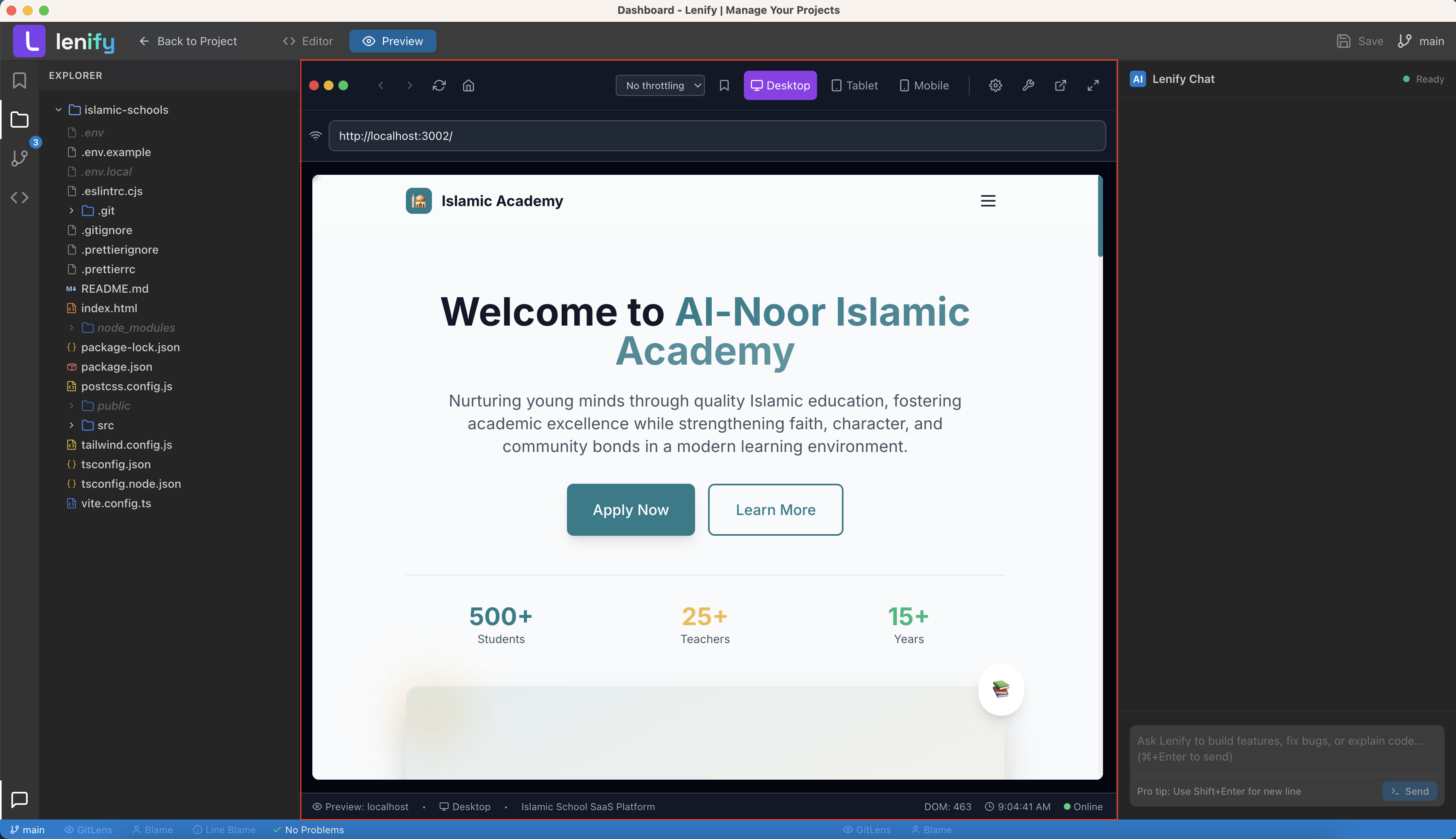 Responsive browser preview with device simulation, developer tools, and real-time updates
Core Preview Features:
- Real-Time Updates: Instant reflection of code changes without manual refresh
- Responsive Design Testing: Test applications across different screen sizes and devices
- Multi-Device Simulation: Simulate various devices including phones, tablets, and desktops
- Browser Engine: Full-featured browser engine with modern web standard support
- Performance Monitoring: Built-in performance analysis and optimization suggestions
Device Simulation and Testing
Comprehensive Device Support:
- Mobile Devices: iPhone, Android, and other mobile device simulation
- Tablet Devices: iPad, Android tablets, and other tablet form factors
- Desktop Resolutions: Various desktop and laptop screen resolutions
- Custom Viewports: Define custom viewport sizes for specific testing needs
- Device Orientation: Test both portrait and landscape orientations
Device-Specific Features:
- Touch Simulation: Simulate touch interactions and gestures
- Device Pixel Ratio: Accurate simulation of high-DPI displays
- Network Conditions: Simulate different network speeds and conditions
- Geolocation: Test location-based features with simulated GPS coordinates
- Sensor Simulation: Simulate device sensors like accelerometer and gyroscope
Integrated Developer Tools
Comprehensive Debugging Suite
Built-in Developer Tools:
- Console Access: Full JavaScript console with error reporting and logging
- Network Monitoring: Monitor network requests, responses, and performance
- Performance Analysis: CPU and memory usage analysis with optimization suggestions
- Security Analysis: Security vulnerability detection and SSL certificate validation
- Accessibility Testing: Built-in accessibility auditing and compliance checking
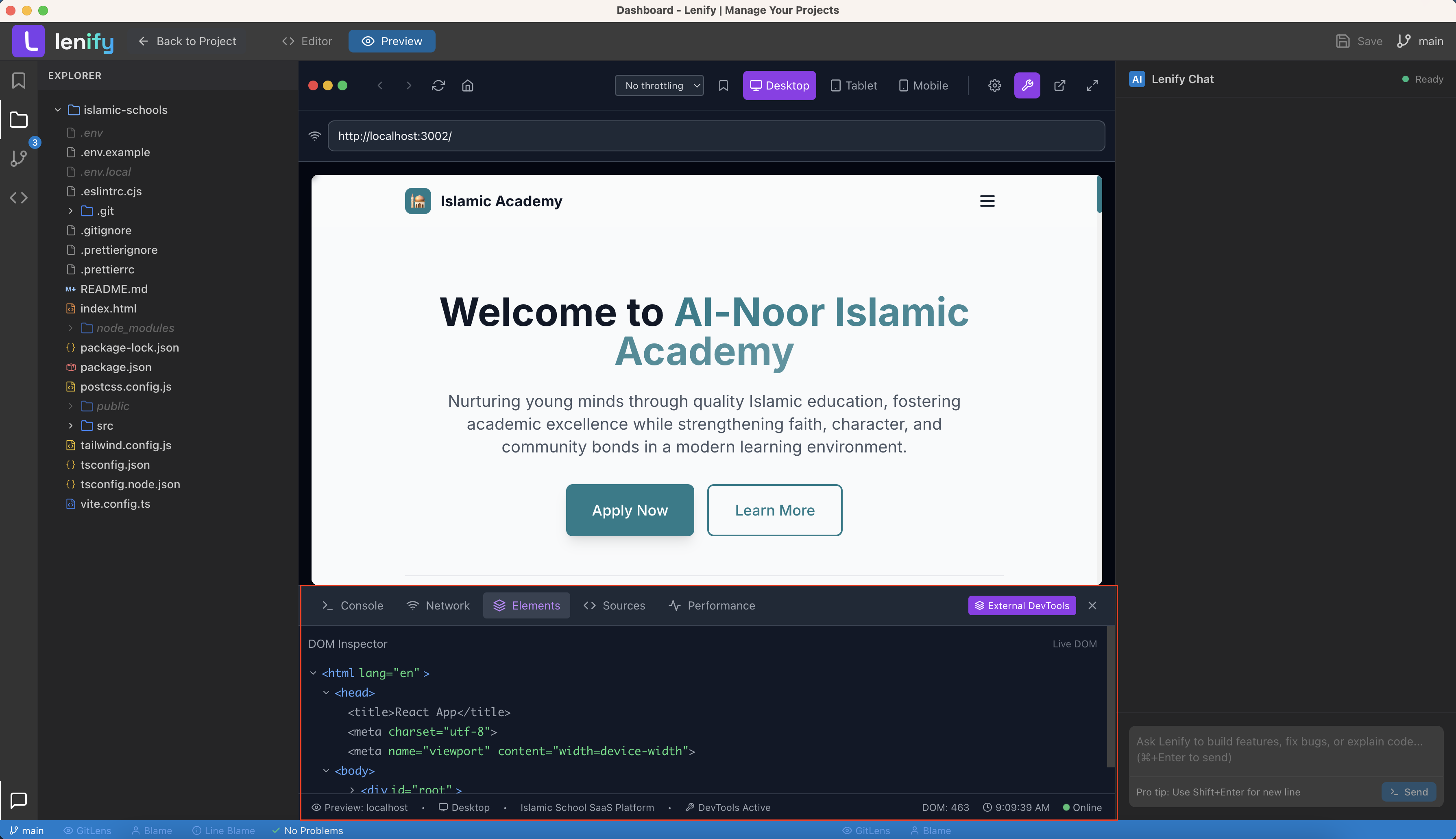 Integrated browser developer tools with console, network monitoring, performance analysis, and responsive testing
Advanced Debugging Capabilities
Debugging Tools:
- Element Inspector: Inspect and modify HTML elements and CSS styles in real-time
- JavaScript Debugger: Set breakpoints, step through code, and inspect variables
- Performance Profiler: Detailed performance profiling with flame graphs and timelines
- Memory Analyzer: Memory usage analysis with leak detection and optimization
- Coverage Analysis: Code coverage analysis to identify unused CSS and JavaScript
Testing and Validation:
- SEO Analysis: Search engine optimization analysis and recommendations
- Performance Audits: Comprehensive performance auditing with actionable insights
- Best Practices: Validation against web development best practices
- Progressive Web App: PWA compliance testing and service worker debugging
- Manifest Validation: Web app manifest validation and testing
Real-Time Development Synchronization
Live Code Updates
Instant Development Feedback:
- Hot Module Replacement: Real-time module updates without losing application state
- CSS Live Updates: Instant CSS changes without page refresh
- JavaScript Reload: Smart JavaScript reloading with state preservation
- Asset Synchronization: Automatic synchronization of images, fonts, and other assets
- Error Overlay: Real-time error display with source code context
Development Server Integration
Server Management:
- Automatic Server Detection: Detect and connect to development servers automatically
- Port Configuration: Flexible port configuration for different development setups
- Proxy Support: Proxy configuration for API calls and backend integration
- HTTPS Support: HTTPS development server support for secure feature testing
- Custom Headers: Configure custom headers for testing different scenarios
Framework Integration:
- React Integration: Seamless integration with React development servers
- Vue.js Integration: Native support for Vue.js development workflows
- Angular Integration: Complete Angular CLI development server integration
- Next.js Integration: Full Next.js development and build preview support
- Static Site Integration: Support for static site generators and build tools
Multi-View Development Environment
Split View Development
Layout Options:
- Side-by-Side: Code editor and preview side-by-side for efficient development
- Stacked Layout: Vertical stacking for different aspect ratio preferences
- Full-Screen Preview: Dedicated full-screen preview mode for testing
- Picture-in-Picture: Floating preview window for multi-monitor setups
- Tabbed Interface: Tabbed preview interface for multiple preview configurations
Synchronized Navigation:
- URL Synchronization: Synchronized navigation between code and preview
- History Management: Browser history integration with development workflow
- Bookmark Integration: Save and manage development bookmarks and test scenarios
- Session Restoration: Restore preview sessions and configurations across restarts
- State Persistence: Maintain application state during code changes
Collaborative Preview
Team Sharing:
- Live Preview Sharing: Share live preview sessions with team members
- Collaborative Testing: Multiple team members can test simultaneously
- Annotation Tools: Add annotations and feedback directly on preview interface
- Screenshot Sharing: Capture and share screenshots with annotations
- Recording Capabilities: Record user interactions for bug reports and demonstrations
Advanced Testing Features
Automated Testing Integration
Test Automation:
- Visual Regression Testing: Automatic detection of visual changes and regressions
- Accessibility Testing: Automated accessibility compliance testing
- Performance Benchmarking: Automated performance benchmarking and regression detection
- Cross-Browser Testing: Test across multiple browser engines and versions
- User Flow Testing: Automated testing of common user workflows and interactions
Integration Testing:
- API Testing: Test API integrations and data flow
- Form Testing: Automated form validation and submission testing
- Authentication Testing: Test login flows and authentication systems
- Payment Testing: Test payment integration with sandbox environments
- Third-Party Integration: Test external service integrations and dependencies
Quality Assurance Tools
Code Quality Integration:
- Lint Integration: Real-time linting and code quality feedback in preview
- Type Checking: TypeScript and other type checking integration
- Bundle Analysis: Bundle size analysis and optimization recommendations
- Dependency Analysis: Analysis of third-party dependencies and their impact
- Security Scanning: Real-time security vulnerability scanning
Performance Optimization:
- Loading Performance: Analyze and optimize page loading performance
- Runtime Performance: Monitor runtime performance and identify bottlenecks
- Memory Usage: Track memory usage and identify memory leaks
- Network Optimization: Optimize network requests and data transfer
- Caching Strategy: Analyze and optimize caching strategies
Customization and Configuration
Preview Settings
Appearance Customization:
- Theme Integration: Preview themes that match development environment
- Custom CSS: Inject custom CSS for testing different styles
- User Agent: Customize user agent strings for testing different browsers
- Viewport Meta: Override viewport meta tags for testing responsive behavior
- Font Rendering: Control font rendering and typography testing
Behavior Configuration:
- Auto-Refresh Settings: Configure automatic refresh behavior and timing
- Error Handling: Customize error display and handling in preview
- Console Logging: Configure console logging levels and filtering
- Network Throttling: Simulate different network conditions for testing
- Cache Control: Control browser caching behavior for development
Integration Preferences
Development Workflow:
- Build Integration: Integration with build tools and compilation processes
- Deployment Preview: Preview applications in deployment-like environments
- Environment Variables: Configure environment variables for different testing scenarios
- Feature Flags: Integration with feature flag systems for testing
- A/B Testing: Support for A/B testing and experimentation frameworks
External Tool Integration:
- Analytics Testing: Test analytics integration and tracking
- SEO Tools: Integration with SEO analysis and optimization tools
- Monitoring Integration: Integration with application monitoring and error tracking
- CDN Testing: Test CDN integration and asset delivery
- SSL Testing: Test SSL/TLS configuration and security features
Continue to Terminal to learn about development tools, or return to IDE Interface Overview for more development tools.