AI Assistance
Harness the full power of Lenify's AI-driven development assistance for intelligent coding, debugging, and project guidance.
Conversational AI Development
Natural Language Programming
Transform your development process with AI that understands both natural language and your complete project context.
AI Chat Interface
Intelligent Conversation:
- Context-Aware Responses: AI understands your entire project blueprint and codebase structure
- Natural Language Queries: Ask questions and request features using plain English
- Technical Discussions: Engage in deep technical discussions about architecture and implementation
- Learning Assistance: Get explanations of complex concepts and coding patterns
Real-Time Code Generation:
- Live Streaming: Watch code being generated in real-time with proper syntax highlighting
- Multiple Approaches: Receive different implementation options for comparison and selection
- Instant Integration: Generated code can be immediately copied or inserted into your project
- Context Preservation: AI maintains conversation context across multiple interactions
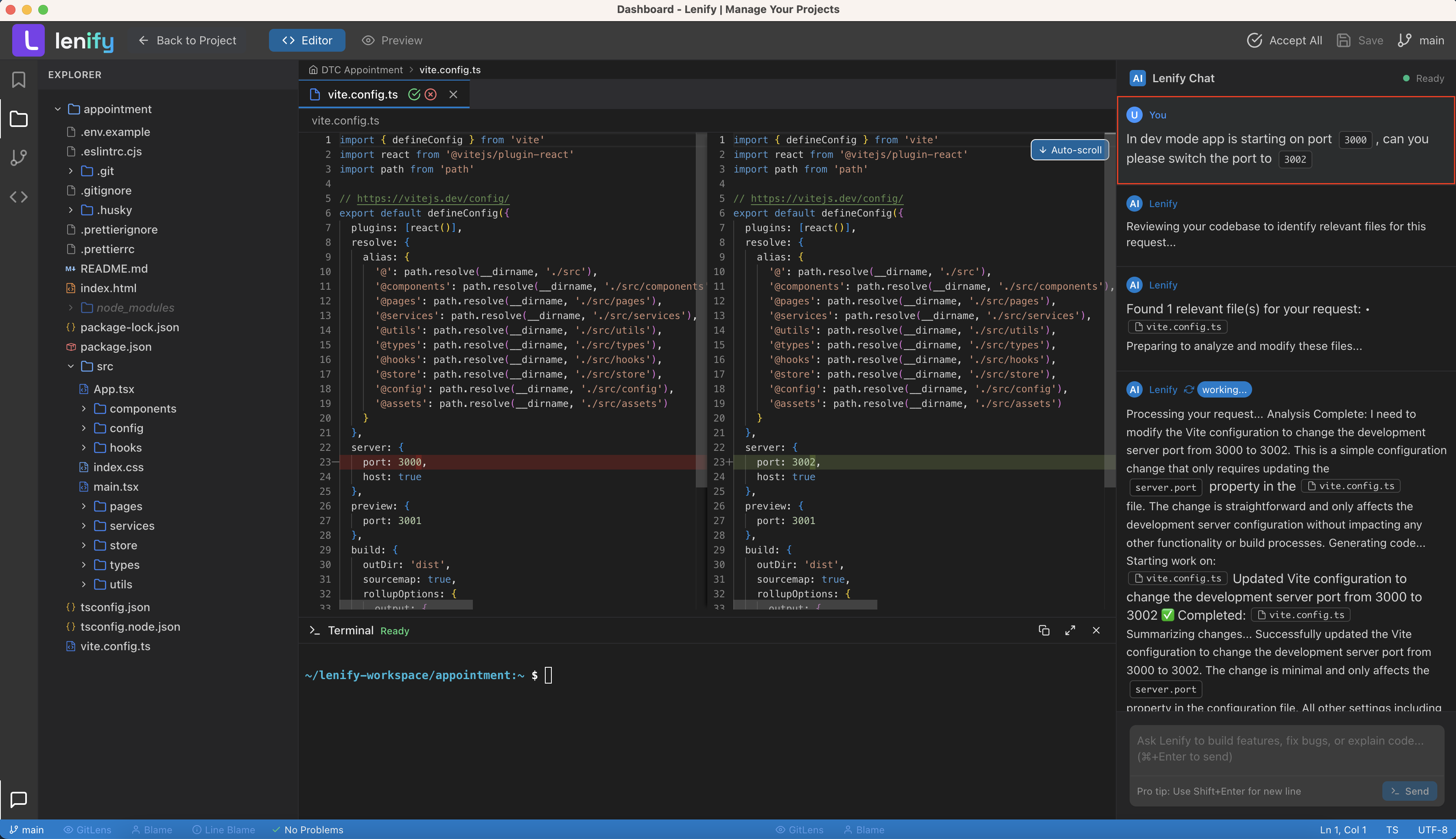 Powerful chat interface with real-time code generation, syntax highlighting, and context-aware assistance
Advanced AI Capabilities
Code Understanding:
- Code Explanation: Get detailed explanations of existing code sections and algorithms
- Pattern Recognition: AI identifies and explains coding patterns and architectural decisions
- Best Practice Guidance: Receive suggestions for industry best practices and optimization
- Refactoring Suggestions: Get intelligent recommendations for code improvement
Problem Solving:
- Debugging Assistance: Describe issues and receive targeted debugging strategies
- Error Resolution: AI provides specific solutions for error messages and exceptions
- Performance Optimization: Get suggestions for improving code performance and efficiency
- Security Analysis: Identify potential security issues and receive remediation guidance
Blueprint-Aware AI Assistance
Project Context Integration
Complete Project Understanding:
- Blueprint Integration: AI has complete access to your project blueprint and specifications
- Architecture Awareness: Understanding of your project's architecture and design patterns
- Feature Context: AI understands relationships between different features and requirements
- Progress Tracking: Awareness of current development progress and completed tasks
Intelligent Suggestions:
- Feature Implementation: AI provides implementation guidance based on blueprint specifications
- Task Prioritization: Suggestions for optimal task ordering based on dependencies
- Resource Optimization: Recommendations for efficient resource usage and development approach
- Timeline Management: Insights into realistic timeline estimates and potential bottlenecks
Code Generation with Blueprint Context
Contextual Code Generation:
- Architectural Consistency: Generated code follows your blueprint's architectural patterns
- Integration Awareness: Code integrates seamlessly with existing project structure
- Naming Conventions: Consistent naming based on established project conventions
- Database Integration: Code generation that properly integrates with blueprint database schema
Feature-Specific Generation:
- User Story Implementation: Generate complete feature implementations from user stories
- API Development: Create API endpoints based on blueprint specifications
- UI Component Generation: Generate user interface components matching blueprint wireframes
- Test Generation: Create comprehensive tests based on feature requirements
Interactive Development Tools
Chat Interface Controls
Advanced Interaction Features:
- Streaming Control: Start, stop, and pause code generation processes as needed
- Response Management: Save, edit, and reuse AI responses for future reference
- Code Manipulation: Copy, insert, and modify generated code with one-click actions
- History Navigation: Access complete conversation history for learning and reference
Customization Options:
- Response Style: Configure AI response style (detailed, concise, technical, beginner-friendly)
- Code Preferences: Set preferences for coding style, frameworks, and patterns
- Context Depth: Adjust how much project context AI considers in responses
- Language Settings: Configure preferred programming languages and frameworks
Code Integration Features
Seamless Code Integration:
- Direct Insertion: Insert generated code directly into active files with proper formatting
- Smart Placement: AI suggests optimal placement for new code within existing files
- Conflict Resolution: Intelligent handling of conflicts when inserting code into existing files
- Import Management: Automatic management of imports and dependencies for generated code
Code Review and Validation:
- Quality Checking: AI validates generated code against project standards and best practices
- Testing Integration: Suggest and generate appropriate tests for new code
- Documentation Generation: Automatic generation of code comments and documentation
- Performance Analysis: Analysis of generated code for potential performance issues
AI-Powered Debugging and Error Resolution
Intelligent Error Detection
Real-Time Analysis:
- Continuous Monitoring: AI continuously analyzes your code for potential issues
- Context-Aware Detection: Error detection that understands your project's specific context
- Predictive Analysis: AI predicts potential issues before they become actual problems
- Pattern Recognition: Identification of problematic patterns and anti-patterns
Comprehensive Issue Types:
- Syntax Errors: Detection and correction of syntax and structural issues
- Logic Errors: Identification of logical flaws and incorrect implementations
- Performance Issues: Detection of performance bottlenecks and optimization opportunities
- Security Vulnerabilities: Identification of potential security risks and vulnerabilities
Automated Fix Suggestions
Intelligent Resolution:
- Specific Fixes: AI provides exact code changes to resolve detected issues
- Multiple Options: Different approaches to fixing the same problem
- Impact Analysis: Understanding of how fixes affect other parts of the codebase
- Learning Integration: AI learns from your preferences to provide better suggestions over time
Fix Implementation:
- One-Click Fixes: Apply suggested fixes with single-click implementation
- Batch Fixes: Apply multiple related fixes simultaneously
- Undo Capability: Easy reversal of applied fixes if needed
- Explanation: Detailed explanations of what caused issues and how fixes resolve them
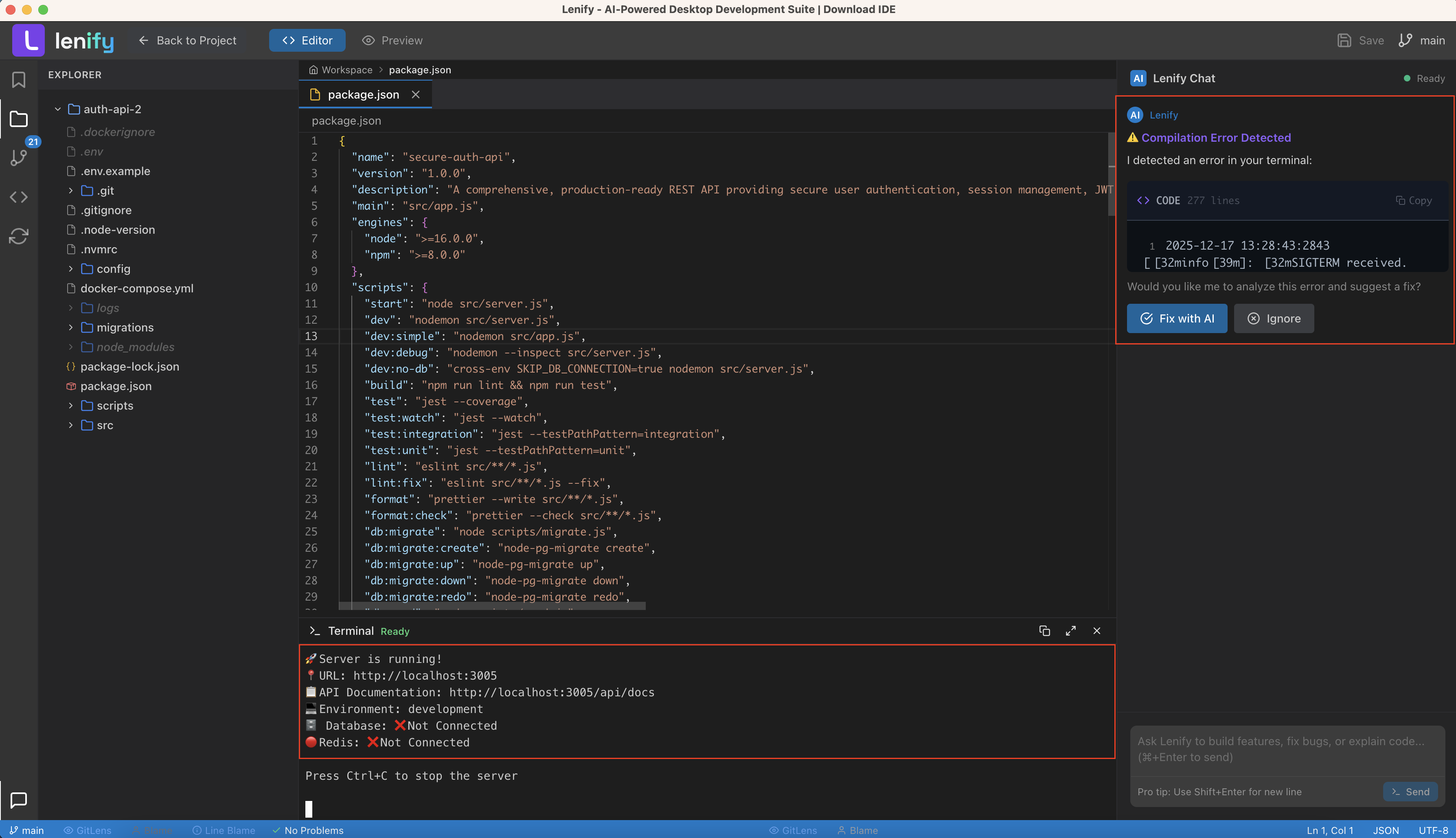 AI automatically detects potential issues in real-time and offers intelligent suggestions with auto-fix capabilities
Advanced AI Features
Learning and Adaptation
Personalized AI Experience:
- Pattern Learning: AI learns your coding style and preferences over time
- Context Adaptation: AI adapts to your project's specific requirements and constraints
- Feedback Integration: AI improves suggestions based on your feedback and choices
- Team Learning: AI learns from team patterns and shared best practices
Multi-Model Support
Current AI Model Integration:
- Anthropic Claude: Primary AI model for code generation and assistance
- Model Optimization: AI responses optimized for development tasks
- Context Management: Efficient handling of large project contexts
- Rate Limiting: Intelligent management of API usage and rate limits
Future Model Expansion:
- OpenAI GPT Models: Planned integration with GPT-4 and future releases
- Google Gemini: Support for Gemini Pro and Ultra models
- Specialized Models: Integration with coding-specific AI models
- Multi-Model Comparison: Compare responses from different AI models
AI Assistance Best Practices
Effective AI Interaction
Communication Strategies:
- Clear Questions: Ask specific, well-defined questions for better responses
- Context Provision: Provide relevant context about your specific use case
- Iterative Refinement: Use follow-up questions to refine and improve suggestions
- Feedback Provision: Provide feedback to help AI learn your preferences
Development Workflow Integration:
- Regular Consultation: Use AI assistance throughout your development process
- Code Reviews: Include AI in your code review process for additional insights
- Architecture Decisions: Consult AI for architectural and design decisions
- Learning Opportunities: Use AI to learn new technologies and best practices
Maximizing AI Benefits
Productivity Enhancement:
- Automation: Automate repetitive tasks using AI assistance
- Quick Prototyping: Use AI for rapid prototyping and proof-of-concept development
- Documentation: Leverage AI for code documentation and explanation
- Testing: Use AI to generate comprehensive test cases and scenarios
Quality Improvement:
- Best Practices: Learn and apply industry best practices through AI guidance
- Code Quality: Use AI to maintain high code quality and consistency
- Performance: Optimize code performance with AI suggestions
- Security: Enhance code security through AI-powered vulnerability detection
Continue to Source Control to learn about Git integration, or explore Development Tools for additional development utilities.